글로벌 설정
application.yml로 설정하기
spring:
  data:
    web:
      pageable:
        default-page-size: 12
        max-page-size: 200
        one-indexed-parameters: true
default-page-size : 기본 페이지 사이즈
max-page-size : 요청할 수 있는 최대 페이지 사이즈
one-indexed-parameters : true로 했을 경우 페이지 사이즈가 1번부터 시작 (원래는 0번부터 시작한다)
이 외에도 Spring 에서는 다양한 설정들을 제공해주고 있다.
아래 스프링 공식문서를 참고해서 사용해볼 것 !
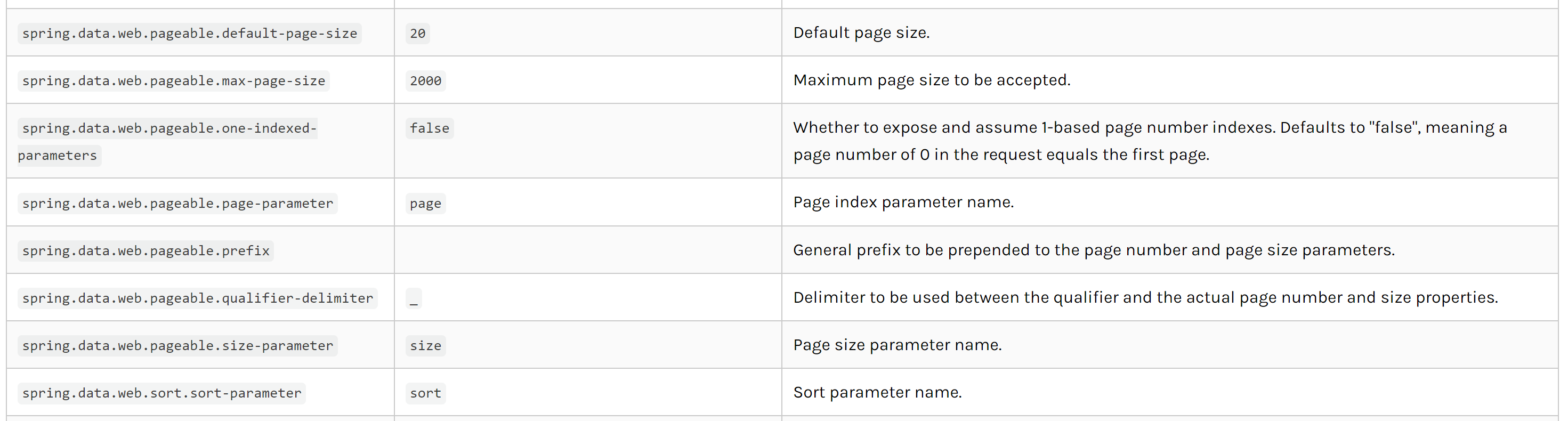
Common Application properties
Various properties can be specified inside your application.properties file, inside your application.yml file, or as command line switches. This appendix provides a list of common Spring Boot properties and references to the underlying classes that consume
docs.spring.io
개별 설정
1. @PageableDefault 사용
@GetMapping("/cafe/all")
public Page<CafeDTO> cafeAllList(@PageableDefault(size = 12, sort = "name") Pageable pageable) {
    return cafeService.cafeAllList(pageable);
}
PageableDefault (Spring Data Core 3.1.0 API)
Since: 1.6 Author: Oliver Gierke, Mark Paluch Optional Element Summary Optional Elements The direction to sort by. int The default page number the injected Pageable should use if no corresponding parameter defined in request (default is 0). int The default
docs.spring.io
2. PageRequest 사용
PageRequest pageRequest = PageRequest.of(0, 3, Sort.by(Sort.Direction.DESC, "username"));

Slice<Member> page = memberRepository.findSliceByAge(age, pageRequest);
필요한 대로 PageRequest 객체를 만들어 Pageable 파라미터로 넣어주면 된다 !
PageRequest.of(0, 3, Sort.by(Sort.Direction.DESC, "username")) 에서
파라미터는 순서대로 page, size, sort 이다.
참고
JPA Paging (페이지 나누기)
현재 2개의 프로젝트 진행하고 있다. > 두 프로젝트 모두 글 또는 영상을 페이징해서 프론트에 뿌려주는 API가 필요했다. > 그래서 이번에 PageRequest를 사용해 페이징 하는 것을 공부했고 공유하고
velog.io
'escape-room' 카테고리의 다른 글
| [Spring] Required request parameter '인자' for method parameter type String is not present 에러 (0) | 2023.05.19 |
|---|---|
| [IntelliJ] 자주 쓰는 IntelliJ 단축키 (0) | 2023.05.18 |
| [AWS] EC2 배포 관련 명령어 (1) | 2023.05.17 |
| [Spring/AWS] com.amazonaws.SdkClientException: Failed to connect to service endpoint: 에러 해결하기 ! (0) | 2023.05.17 |
| [DBeaver] 엑셀, csv 파일 import 시 한글 깨짐 및 컬럼이 증가하는 경우 해결법 (1) | 2023.05.17 |