만들고자 한 목표
방탈출 테마 리스트.
이를 위한 DTO는 다음과 같다.
@Getter
public class ThemeListDTO {

    private Long themeId;
    private String themeName;
    private String genre;
    private Integer recommendStart;
    private Integer recommendEnd;
    private String imageUrl;

    private String cafeName;
    private String location;

    private Double ratingAvg;
}
테마 리스트에 테마에 대한 정보, 해당 테마가 소속된 방탈출 카페에 대한 정보, 해당 테마에 달린 리뷰들의 평균 점수까지 필요하다.
따라서 Theme, Cafe, Review를 Join 하여 정보를 가져와야한다.
리스트는 테마에 달린 리뷰들의 평균 점수를 기준으로 내림차순(desc) 정렬하려고 한다.
이때 해당 테마에 달린 리뷰가 없을 수도 있으니 NULL에 대한 처리도 신경써서 해주어야 한다 .. !
정말 정말 많은 에러와 시행착오가 있었는데 단계별로 코드를 어떻게 변화시켜 최종 코드가 되었는지 설명해보려고 한다.
전체 코드 (Github)
https://github.com/maemae22/escape-room/pull/36
feat: #21 - [GET] 테마 전체 목록 조회 API 개발 (/theme/all) by maemae22 · Pull Request #36 · maemae22/escape-room
feat: #21 - ThemeListDTO 개발 테마 리스트에 필요한 필드로 DTO를 작성함 feat: #21 전체 테마 리스트 반환하는 쿼리 작성 (Repository) Join 2번 (Theme, Cafe, Review) 해당 테마에 달린 리뷰가 없을 경우 리뷰 평균
github.com
1. java.lang.IllegalArgumentException: review.theme is not a root path 에러발생
public class ThemeRepositoryCustomImpl implements ThemeRepositoryCustom {

    private final JPAQueryFactory queryFactory;

    public ThemeRepositoryCustomImpl(JPAQueryFactory queryFactory) {
        this.queryFactory = queryFactory;
    }

    @Override
    public Page<ThemeListDTO> themeAllListPage(Pageable pageable) {

        List<ThemeListDTO> themeListContent = queryFactory
                .select(new QThemeListDTO(
                        theme.id,
                        theme.name,
                        theme.genre,
                        theme.recommendStart,
                        theme.recommendEnd,
                        theme.imageUrl,
                        cafe.name,
                        cafe.location,
                        review.rating.avg()
                ))
                .from(theme)
                .leftJoin(theme.cafe, cafe)
                .leftJoin(theme, review.theme)
                .orderBy(review.rating.avg().desc())
                .offset(pageable.getOffset())
                .limit(pageable.getPageSize())
                .fetch();

        JPAQuery<Long> countQuery = queryFactory
                .select(theme.count())
                .from(theme);

        return PageableExecutionUtils.getPage(themeListContent, pageable, countQuery::fetchOne);
    }
}
처음에 위와 같이 코드를 작성하였다.
2023-05-24 13:35:00.368 ERROR 23568 --- [nio-8080-exec-3] o.a.c.c.C.[.[.[/].[dispatcherServlet] : Servlet.service() for servlet [dispatcherServlet] in context with path [] threw exception [Request processing failed; nested exception is org.springframework.dao.InvalidDataAccessApiUsageException: review.theme is not a root path; nested exception is java.lang.IllegalArgumentException: review.theme is not a root path] with root cause java.lang.IllegalArgumentException: review.theme is not a root path

java.lang.IllegalArgumentException: review.theme is not a root path 에러 발생
review.theme가 유효한 루트 경로가 아니라는 오류이다.
유효한 루트 경로가 아닐 경우 IllegalArgumentException 예외가 발생한다.
Querydsl을 사용하여 쿼리를 작성할 때, 루트 경로는 주어진 엔티티의 필드를 나타내는 것이어야 한다.
따라서
.leftJoin(theme, review.theme) 이 부분을
.leftJoin(theme.reviews, review)이렇게 변경해 주었더니 is not a root path 에러는 사라졌다
2. 데이터가 한건만 출력되는 오류 발생 : 집계 함수와 GROUP BY
@Override
    public Page<ThemeListDTO> themeAllListPage(Pageable pageable) {

        List<ThemeListDTO> themeListContent = queryFactory
                .select(new QThemeListDTO(
                        theme.id,
                        theme.name,
                        theme.genre,
                        theme.recommendStart,
                        theme.recommendEnd,
                        theme.imageUrl,
                        cafe.name,
                        cafe.location,
                        review.rating.avg()
                ))
                .from(theme)
                .leftJoin(theme.cafe, cafe)
                .leftJoin(theme.reviews, review)
                .orderBy(review.rating.avg().desc())
                .offset(pageable.getOffset())
                .limit(pageable.getPageSize())
                .fetch();

        JPAQuery<Long> countQuery = queryFactory
                .select(theme.count())
                .from(theme);

        return PageableExecutionUtils.getPage(themeListContent, pageable, countQuery::fetchOne);
    }
이렇게 코드를 작성하고 실행시켜 보았는데
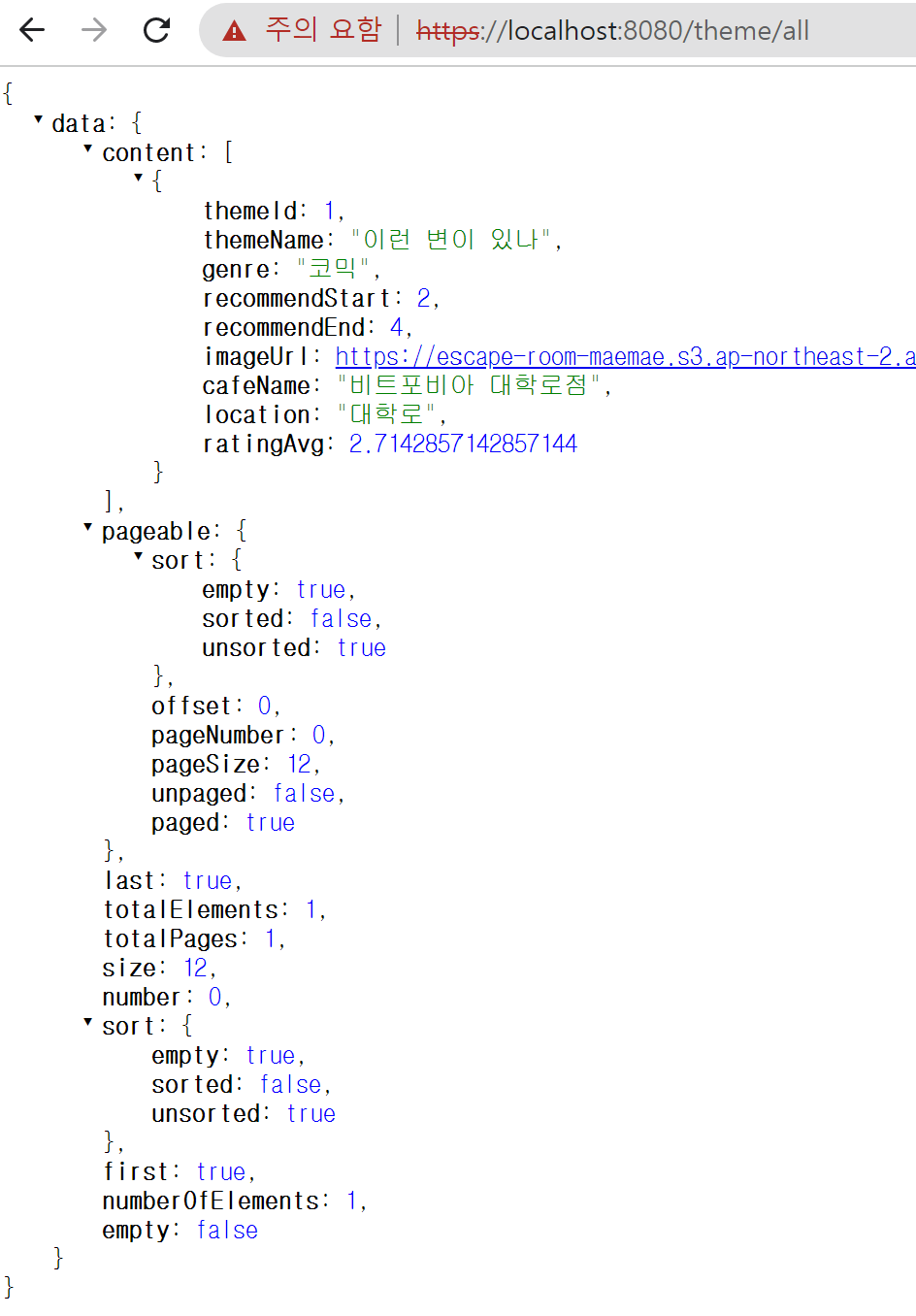
page size는 12로 설정되어 있는데 한 건의 데이터만 출력되는 일이 발생하였다.
이때 DB에는 테마 종류가 총 97개 있고,
리뷰는 한 테마(3번 테마 이일호)에만 5개가 달려있고, 나머지 테마에 대해서는 리뷰가 없는 상황이였다.
따라서 나는 한 건의 데이터만 출력되었을 때,
현재 한 테마에만 리뷰가 달려있고 나머지 테마에는 리뷰가 아예 없기 때문에
리뷰 관련하여 NULL 처리하는 과정에서 문제가 생겼다고만 생각했다.
하지만 p6spy 로그를 통해 SQL 쿼리문을 살펴보면
select theme0_.theme_id as col_0_0_, theme0_.name as col_1_0_, theme0_.genre as col_2_0_, theme0_.recommend_start as col_3_0_, theme0_.recommend_end as col_4_0_, theme0_.image_url as col_5_0_, cafe1_.name as col_6_0_, cafe1_.location as col_7_0_, avg(reviews2_.rating) as col_8_0_ from theme theme0_ left outer join cafe cafe1_ on theme0_.cafe_id=cafe1_.cafe_id left outer join review reviews2_ on theme0_.theme_id=reviews2_.theme_id order by avg(reviews2_.rating) desc limit 12;
내가 의도한대로 left outer join인데 대체 왜 NULL 처리하는 것에서 문제가 생겼을까 ..?
리뷰가 달려있는 테마가 총 1개인데 데이터도 1건만 출력되었기 때문에
나는 NULL 과 관련된 오류라고 생각하고 거기에 너무 매몰되어 있었다.
따라서 이 오류를 해결하는데 거의 반나절이 걸렸는데...
원인은 평균을 구하기 위해서 사용했던 avg() 함수 때문이였다 .. !
AVG()는 집계 함수이다.
이 집계 함수는 그룹 마다의 계산을 보여주는데,
GROUP BY 없이 사용 시 테이블 전체가 하나의 그룹이 되어 데이터가 한 건만 출력되게 된다.
이것을 깨닫고 자세히 보니
여기에서 테마 id와 이름이 내가 리뷰를 달아놓았던 3번 이일호씨 테마가 아니라
1번 이런 변이 있나 테마인 것을 확인할 수 있었다 .. (왜 아까는 눈에 잘 안 보였을까ㅠ..)
1번 테마에는 달려있는 리뷰가 없으므로 ratingAvg가 2.71- 과 같이 표시될 수가 없다고 생각해야 맞는건데
아까는 데이터가 1건만 출력되었다는 것에만 너무 집중하여서 1번 테마인 것도 눈치채지 못했었다 ...
내가 원하는 데이터는 각 테마의 리뷰 평균 점수를 알고 싶은 것이니
group by theme_id 를 추가해야 한다.
따라서 코드에 group by 를 추가하였다.
.groupBy(theme.id)3. 리뷰의 NULL 처리 : coalesce(n), nullsFirst(), nullsLast() 등 사용
@Override
    public Page<ThemeListDTO> themeAllListPage(Pageable pageable) {

        List<ThemeListDTO> themeListContent = queryFactory
                .select(new QThemeListDTO(
                        theme.id,
                        theme.name,
                        theme.genre,
                        theme.recommendStart,
                        theme.recommendEnd,
                        theme.imageUrl,
                        cafe.name,
                        cafe.location,
                        review.rating.avg()
                ))
                .from(theme)
                .leftJoin(theme.cafe, cafe)
                .leftJoin(theme.reviews, review)
                .groupBy(theme.id)
                .orderBy(review.rating.avg().desc())
                .offset(pageable.getOffset())
                .limit(pageable.getPageSize())
                .fetch();

        JPAQuery<Long> countQuery = queryFactory
                .select(theme.count())
                .from(theme);

        return PageableExecutionUtils.getPage(themeListContent, pageable, countQuery::fetchOne);
    }
위와 같이 코드를 작성하고 보니
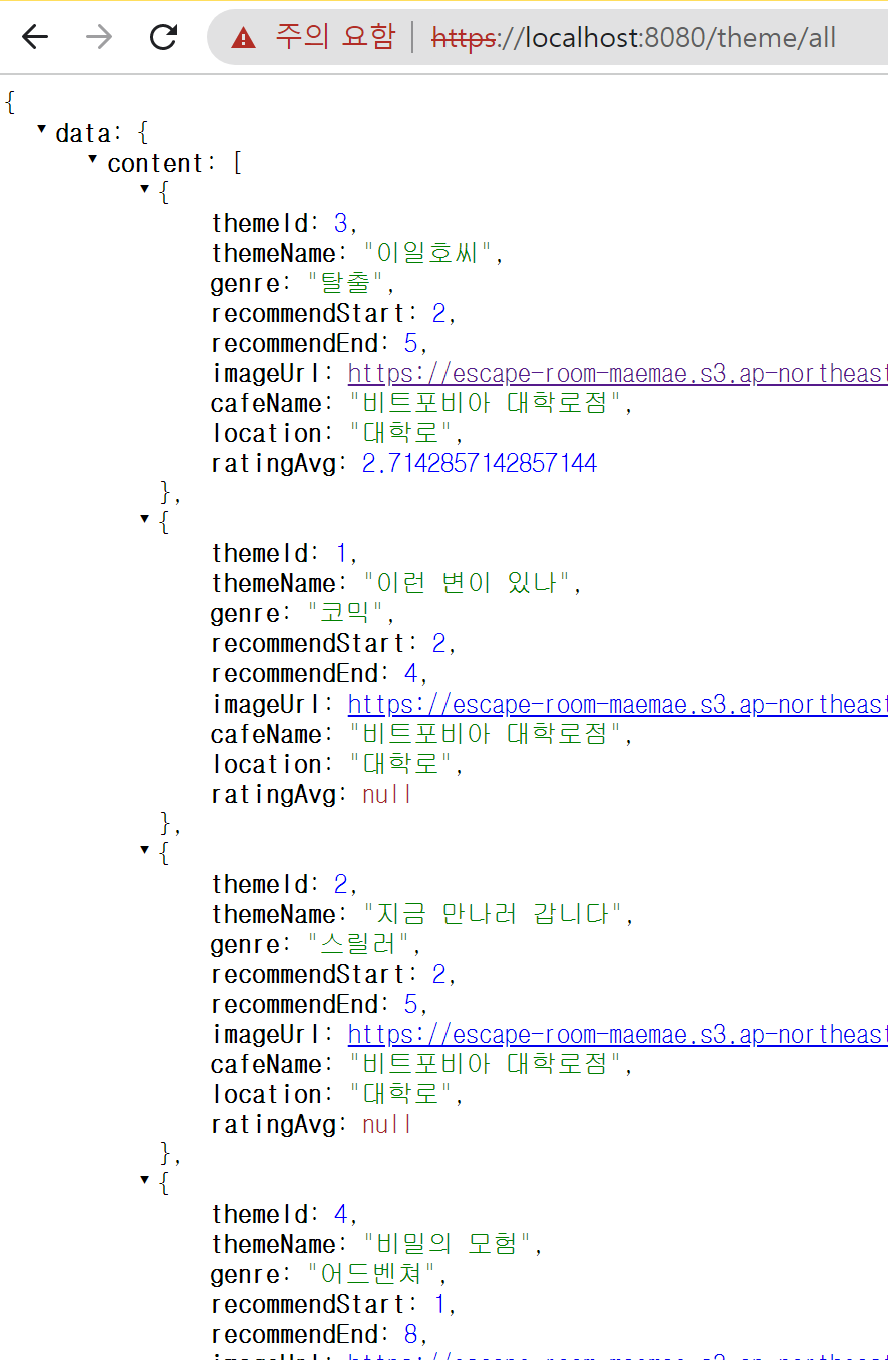
모든 테마가 잘 출력되기는 했는데,
리뷰가 없는 테마에 대해서는 ratingAvg가 null로 출력되었다.
이렇게 null이 있을 경우
NullPointerException과 관련하여 에러가 발생할 수 있다.
따라서 null일 경우 coalesce 함수를 사용하여 -1.0이 출력되도록 바꾸어주었다.
// select절
review.rating.avg().coalesce(-1.0)
이렇게 하면 null로 출력되는 일은 없지만, 이는 실제 null인 데이터를 출력할 때만 -1.0으로 바꾸어 출력하는 것이지 데이터 자체는 당연하게도 null로 남아있다.
현재 정렬에서도 .orderBy(review.rating.avg().desc()) 로
review.rating.avg() 를 정렬 기준으로 사용하고 있기 때문에 nullsFirst() 또는 nullsLast() 를 통해
null 데이터를 맨 앞(혹은 맨 뒤)에 정렬되도록 설정해주는 것이 좋다.
나는 null 데이터를 맨 뒤에 정렬하고 싶기 때문에 nullsLast()를 사용하였다.
// order by
.orderBy(review.rating.avg().desc().nullsLast())

의도한 대로
리뷰가 없는 테마들은 ratingAvg가 coalesce(-1.0)에 의해서 -1.0으로 표시되며, nullsLast()에 의해서 뒤쪽에 정렬된 것을 확인할 수 있다 !
4. 평균 점수의 소수점 반올림 처리 : Expressions.template() 메서드 사용
현재 3번 이일호씨 테마의 ratingAvg가 2.7142857142857144 으로 나온다
소수점이 너무 길기 때문에 반올림하여 소수점 둘째자리까지만 출력되도록 설정해보자.
https://maemae22.tistory.com/114
[QueryDSL] 소수점 반올림하기, ROUND 함수 사용하기 (ex.소수점 n번째 자리까지 반올림하기)
테마 리스트에서 리뷰 평점을 출력하는데 SQL문이 그냥 ~ avg(reviews.rating) ~ 으로 나가기 때문에 저렇게 표시되는 것을 볼 수 있었다. 소수점 둘째짜리까지 나오도록 반올림해서 출력해보자 ! 현재
maemae22.tistory.com
과정 및 설명은 위 글에 작성해두었다.
결론만 말하자면 아래와 같이 코드를 수정하면 된다
Expressions.template(Double.class, "ROUND({0}, 2)", review.rating.avg().coalesce(-1.0))5. 복잡한 경우의 페이징 처리 방법 : count Query 분리하기
최종 코드는 아래와 같다.
public class ThemeRepositoryCustomImpl implements ThemeRepositoryCustom {

    private final JPAQueryFactory queryFactory;

    public ThemeRepositoryCustomImpl(JPAQueryFactory queryFactory) {
        this.queryFactory = queryFactory;
    }

    @Override
    public Page<ThemeListDTO> themeAllListPage(Pageable pageable) {

        List<ThemeListDTO> themeListContent = queryFactory
                .select(new QThemeListDTO(
                        theme.id,
                        theme.name,
                        theme.genre,
                        theme.recommendStart,
                        theme.recommendEnd,
                        theme.imageUrl,
                        cafe.name,
                        cafe.location,
                        Expressions.template(Double.class, "ROUND({0}, 2)", review.rating.avg().coalesce(-1.0))
                ))
                .from(theme)
                .leftJoin(theme.cafe, cafe)
                .leftJoin(theme.reviews, review)
                .groupBy(theme.id)
                .orderBy(review.rating.avg().desc().nullsLast())
                .offset(pageable.getOffset())
                .limit(pageable.getPageSize())
                .fetch();

        JPAQuery<Long> countQuery = queryFactory
                .select(theme.count())
                .from(theme);

        return PageableExecutionUtils.getPage(themeListContent, pageable, countQuery::fetchOne);
    }
}
위 코드를 보면
List<ThemeListDTO> themeListContent 를 가져오는 쿼리와 JPAQuery<Long> countQuery 카운트를 가져오는 쿼리를 분리하여,
최종적으로는
PageableExecutionUtils.getPage(themeListContent, pageable, countQuery::fetchOne) 으로
Page<ThemeListDTO>을 반환한다.
쿼리가 join도 없이 간단한 경우에는
count query를 따로 분리하지 않고 아래와 같이 new PageImpl<>(contents, pageable, total) 을 통해
Page 객체를 만들어 반환해도 된다. (https://maemae22.tistory.com/107)
@Override
public Page<CafeDTO> cafeSearchPage(List<String> loc, String keyword, Pageable pageable) {

    QueryResults<CafeDTO> searchResults = queryFactory
            .select(new QCafeDTO(cafe.id, cafe.name, cafe.phoneNumber,
                    cafe.bhours, cafe.address, cafe.domain, cafe.location))
            .from(cafe)
            .where(locIn(loc), keywordContaining(keyword))
            .orderBy(cafe.location.asc())
            .offset(pageable.getOffset())
            .limit(pageable.getPageSize())
            .fetchResults();

    List<CafeDTO> contents = searchResults.getResults();
    long total = searchResults.getTotal();

    return new PageImpl<>(contents, pageable, total);
}
하지만 현재 테마 목록 content 를 가져오는 쿼리는 join이 2번 있는 복잡한 쿼리이다.
이렇게 복잡한 쿼리일 때 위와 같이 new PageImpl<>(contents, pageable, total)을 통해 Page 객체를 생성하면
count 쿼리도 join이 두번 들어간 복잡한 sql문으로 생성된다.
하지만 테마 목록에서 count 쿼리는
select count(theme_id) from theme위와 같이 아주 간단하게 전체 카운트를 조회하는 방법을 최적화 할 수 있다.
(전체 카운트를 조회할 때 조인 쿼리를 줄일 수 있다면 상당한 효과가 있다.)
따라서 content 쿼리는 복잡한데 count 쿼리는 간단하게 구현할 수 있는 복잡한 페이징 상황에서는
데이터 조회 쿼리와, 전체 카운트 쿼리를 분리하여 작성하고
PageableExecutionUtils.getPage(themeListContent, pageable, countQuery::fetchOne) 을 통해 Page 객체를 반환하는 것이 좋다 !!
정말 우여곡절 끝에 테마 전체 목록 조회 API 개발을 성공적으로 마칠 수 있었다.
혹시 이해 안되시는 부분이 있다면 상단의 Github 링크를 통해 전체 코드를 확인해주시고,
틀린 부분이 있다면 알려주시면 감사하겠습니다 ! ㅎㅎ
'escape-room' 카테고리의 다른 글
| [Spring] Page 객체 내의 필드값 변경하기 (0) | 2023.05.24 |
|---|---|
| [QueryDSL] 소수점 반올림하기, ROUND 함수 사용하기 (ex.소수점 n번째 자리까지 반올림하기) (1) | 2023.05.23 |
| InvalidDefinitionException - No serializer found for class 에러 (0) | 2023.05.23 |
| [Ubuntu] Nginx, Let's Encrypt를 사용하여 HTTPS 설정하기 (+에러 해결) (0) | 2023.05.19 |
| [AWS] DNS 설정하기 : 도메인과 EC2 탄력적 IP 연결 (with. 가비아) (0) | 2023.05.19 |