문제 상황
@Service
@RequiredArgsConstructor
public class ThemeService {

    private final ThemeRepository themeRepository;

    public Page<ThemeListDTO> themeAllList(Pageable pageable) {
        return themeRepository.themeAllListPage(pageable);
    }
}
현재 Service단에서는 Repository단에서 받은 Page<ThemeListDTO> 를 그대로 넘겨주고 있다.
@Getter
public class ThemeListDTO {

    private Long themeId;
    private String themeName;
    private String genre;
    private Integer recommendStart;
    private Integer recommendEnd;
    private String imageUrl;

    private String cafeName;
    private String location;

    private Double ratingAvg;
}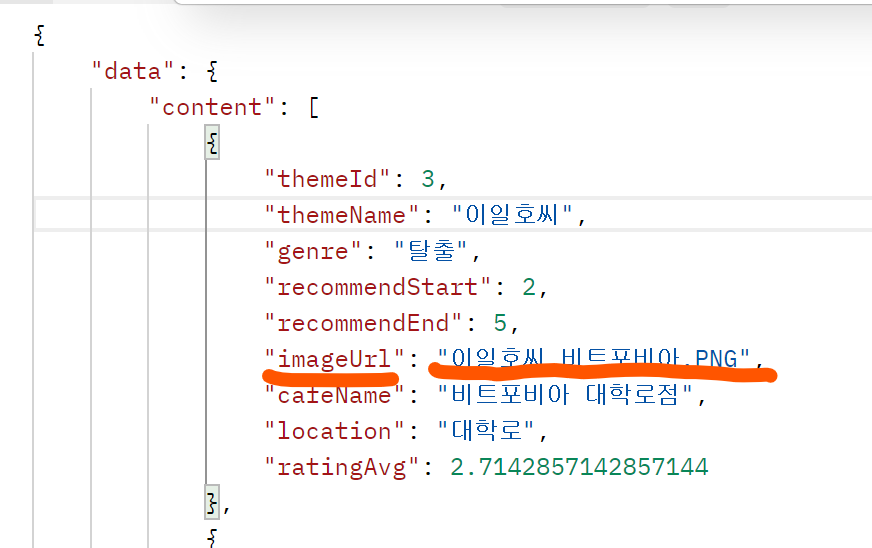
하지만 사실 DB에는 이미지 url 이 아닌 이미지 이름만 저장되어 있다 .. (위 사진 참고)
당연하게도 Repository에서 받아온 Page 객체의 ThemeListDTO에는 DB에서 받아온 값이 저장되어 있으므로 이미지 이름만 있는 상황이다.
따라서 이를 진짜 이미지 url으로 변경해야 한다.
Page 객체 내의 필드값을 변경해보자 !
Page 객체 내의 필드값을 바꾸는 방법
import org.springframework.data.domain.Page;
import org.springframework.data.domain.PageImpl;

// ...

// 기존의 Page<ThemeListDTO> 객체
Page<ThemeListDTO> page = themeRepository.themeAllListPage(pageable);

// 페이지의 내용을 가져옴
List<ThemeListDTO> content = page.getContent();

// 각 DTO의 필드 값을 변경
for (ThemeListDTO dto : content) {
    // 필드 값 변경 예시: name 필드를 "New Name"으로 변경
    dto.setName("New Name");
}

// 변경된 List<ThemeListDTO>를 사용하여 새로운 Page 객체 생성
Page<ThemeListDTO> updatedPage = new PageImpl<>(content, pageable, page.getTotalElements());

// 변경된 Page 객체 사용
// ...
만약 Page<ThemeListDTO>에서 DTO의 필드 값을 변경하고 싶다면, 위와 같이 코드를 작성하면 된다.
1. Page<ThemeListDTO> 객체를 받는다.
2. getContent() 메서드를 사용하여 페이지의 내용을 가져온다. 이는 List<ThemeListDTO>를 반환함.
3. 각 ThemeListDTO 객체에 접근하여 필드 값을 변경한다.
4. 변경한 List<ThemeListDTO>를 사용하여 새로운 Page 객체를 생성한다.
예시)
전
public Page<ThemeListDTO> themeAllList(Pageable pageable) {
    return themeRepository.themeAllListPage(pageable);
}
후
public void changeImageUrl(String imageUrl) {
    this.imageUrl = imageUrl;
}
ThemeListDTO에 imageUrl을 바꾸는 메서드 추가
: changeImageUrl 메서드를 통해 imageUrl을 바꿀 수 있음 (setter와 동일)
public Page<ThemeListDTO> themeAllList(Pageable pageable) {

    Page<ThemeListDTO> page = themeRepository.themeAllListPage(pageable);

    List<ThemeListDTO> content = page.getContent();

    for (ThemeListDTO dto : content) {
        String S3imgUrl = s3UploadService.getThumbnailPath("theme_img/"+dto.getImageUrl());
        dto.changeImageUrl(S3imgUrl);
    }

    return new PageImpl<>(content, pageable, page.getTotalElements());
}
이미지 이름으로 S3에서 img url을 찾아 반환하도록 변경
: Repository에서 받은 Page에서 .getContent() 으로 List을 꺼내 imageUrl을 S3에서 받아온 image url로 변경 후, 변경된 내용으로 새로운 Page 객체를 생성해 반환함
전체 코드 (Github)
https://github.com/maemae22/escape-room/pull/37
refactor: #21 - [GET] 테마 전체 목록 조회 API 변경 (소수점 반올림, 이미지 url S3에서 받아오도록 Page
refactor: #21 - 리뷰 평점 반올림하여 소수점 둘째 자리로 출력되도록 변경 Expressions.template() 메서드를 사용하여 ROUND(@@, 2) 함수를 적용함 정리 : https://maemae22.tistory.com/114 feat: #21 - ThemeListDTO에 imageUrl
github.com
첨언하자면 예시와 같이 S3에서 받아온 url을 그대로 사용하는 것은 좋지 않다.
AWS S3 S3의 엔드포인트 주소를 그대로 사용해야 한다는 점, 버킷이 퍼블릭 공개라는 점, 캐싱을 사용하지 못한다는 점, 서버 부담 및 비용 상의 문제 등의 이유로 CloudFront와 같은 CDN을 통해 S3는 Cloudfront 뒤에 숨기고 Cloudfront를 통해서만 접근이 가능하도록 설정하는 것이 좋다.. !
(참고)
https://techblog.woowahan.com/6217/
사례별로 알아본 안전한 S3 사용 가이드 | 우아한형제들 기술블로그
우아한형제들 인프라보안팀에서 근무하고 있는 이주호입니다. ‘S3를 왜 안전하게 사용해야 하는지 이해’하고 몇 가지 사례를 예시로 들어 ‘더욱 안전하게 사용하기 위해 설정해야 하는 기능
techblog.woowahan.com
본문의 예제는 Page 객체 내의 필드값을 변경하는 예제로만 참고하자 .. !